Exercism - Run-Length Encoding
This post shows you how to get Run-Length Encoding exercise of Exercism.

Preparation
Before we click on our next exercise, let’s see what concepts of DART we need to consider
So we need to use the following concepts.
Classes
Classes define blueprints for objects. They can contain methods that work together to solve a problem.
class RunLengthEncoder {
  String encode(String input) {
    // Encoding logic
    return '';
  }

  String decode(String input) {
    // Decoding logic
    return '';
  }
}

void main() {
  RunLengthEncoder encoder = RunLengthEncoder();
  String encoded = encoder.encode("AABCCCDEEEE");
  print(encoded); // "2AB3CD4E"
}
Expression-Bodied Methods
Expression-bodied methods use => to return a value directly. They’re perfect for concise methods that return a single expression.
class RunLengthEncoder {
  // Expression-bodied method
  String encode(String input) => input.isEmpty ? '' : process(input);

  // Equivalent to:
  String encode2(String input) {
    if (input.isEmpty) {
      return '';
    }
    return process(input);
  }
}
String isEmpty Property
The isEmpty property checks if a string has no characters. It’s useful for handling edge cases.
void main() {
  String empty = '';
  String notEmpty = "ABC";

  // Check if empty
  if (empty.isEmpty) {
    print('String is empty');
  }

  // Use in methods
  String process(String input) {
    if (input.isEmpty) return '';
    // Process non-empty string
    return 'processed';
  }
}
Conditional (Ternary) Operator
The ternary operator (? :) provides a concise way to write if-else statements. It’s useful for simple conditional returns.
void main() {
  String input = "";

  // Ternary operator
  String result = input.isEmpty ? '' : process(input);

  // Equivalent if-else
  String result2;
  if (input.isEmpty) {
    result2 = '';
  } else {
    result2 = process(input);
  }

  // Use in return
  String encode(String input) {
    return input.isEmpty ? '' : encodeString(input);
  }
}
String replaceAllMapped() Method
The replaceAllMapped() method replaces all matches of a pattern with the result of a function. It’s perfect for transforming strings using regular expressions.
void main() {
  String text = "AABCCCD";

  // Replace all matches with function result
  String result = text.replaceAllMapped(
    RegExp(r'(.)\1*'), // Pattern
    (match) => '${match[0]!.length}${match[1]}' // Replacement function
  );
  print(result); // "2A1B3C1D"

  // Function receives Match object
  String encoded = text.replaceAllMapped(
    RegExp(r'(.)\1*'),
    (m) {
      String group = m[0]!; // Full match
      int length = group.length;
      return length > 1 ? '$length${group[0]}' : group[0];
    }
  );
}
Regular Expressions with Capture Groups
Regular expressions can use parentheses to create capture groups. These groups can be accessed in the replacement function.
void main() {
  String text = "AABCCCD";

  // Pattern with capture groups
  // (.) - captures any character (group 1)
  // \1* - matches zero or more of the same character
  RegExp pattern = RegExp(r'(.)\1*');

  String result = text.replaceAllMapped(pattern, (m) {
    String fullMatch = m[0]!; // Full match: "AA", "B", "CCC", "D"
    String captured = m[1]!; // First capture group: "A", "B", "C", "D"
    int length = fullMatch.length;
    return length > 1 ? '$length$captured' : captured;
  });
  print(result); // "2AB3CD"
}
Match Object and Capture Groups
The Match object from replaceAllMapped provides access to the full match and capture groups using index notation.
void main() {
  String text = "12WB";

  // Pattern: (\d*) captures digits, ([^\d]) captures non-digit
  RegExp pattern = RegExp(r'(\d*)([^\d])');

  String result = text.replaceAllMapped(pattern, (m) {
    String fullMatch = m[0]!; // "12W" or "B"
    String digits = m[1]!; // "12" or "" (first capture group)
    String character = m[2]!; // "W" or "B" (second capture group)

    int count = digits.isEmpty ? 1 : int.parse(digits);
    return character * count; // Repeat character
  });
  print(result); // "WWWWWWWWWWWWB"
}
String Multiplication
Strings can be multiplied by integers to repeat them. This is perfect for decoding run-length encoded strings.
void main() {
  String character = "A";

  // Multiply string (repeat)
  String repeated = character * 3;
  print(repeated); // "AAA"

  // Use in decoding
  String decode(String encoded) {
    // Parse count and character
    int count = 2;
    String char = "B";
    return char * count; // "BB"
  }

  // Example: "2A" -> "AA"
  String result = "A" * 2;
  print(result); // "AA"
}
Null Assertion Operator (!)
The null assertion operator (!) tells Dart that a value won’t be null. It’s used when you’re certain a value exists, like with regex match groups.
void main() {
  String text = "AA";
  RegExp pattern = RegExp(r'(.)\1*');
  Match? match = pattern.firstMatch(text);

  if (match != null) {
    // Use null assertion when we know match exists
    String fullMatch = match[0]!; // "AA"
    String captured = match[1]!; // "A"
  }

  // In replaceAllMapped, match is guaranteed to exist
  String result = text.replaceAllMapped(pattern, (m) {
    return m[0]!; // Safe to use ! (match exists)
  });
}
int.parse() Method
The int.parse() method converts a string to an integer. It’s used to parse the count from encoded strings.
void main() {
  // Parse single digit
  int count = int.parse('2');
  print(count); // 2

  // Parse multiple digits
  int count2 = int.parse('12');
  print(count2); // 12

  // Use in decoding
  String digits = "12";
  int repeatCount = int.parse(digits);
  String character = "W";
  String decoded = character * repeatCount;
  print(decoded); // "WWWWWWWWWWWW"
}
Regular Expression Patterns
Regular expression patterns define what to match. Common patterns for RLE:
(.)\1*: Matches a character followed by zero or more of the same character(\d*)([^\d]): Matches optional digits followed by a non-digit character
void main() {
  // Pattern for encoding: match runs of same character
  // (.) - capture any character
  // \1* - match zero or more of the same (backreference)
  RegExp encodePattern = RegExp(r'(.)\1*');

  // Pattern for decoding: match count and character
  // (\d*) - capture zero or more digits
  // ([^\d]) - capture one non-digit character
  RegExp decodePattern = RegExp(r'(\d*)([^\d])');

  // Test patterns
  String text = "AAB";
  print(encodePattern.hasMatch(text)); // true

  String encoded = "2AB";
  print(decodePattern.hasMatch(encoded)); // true
}
String Interpolation
String interpolation allows you to embed expressions in strings using ${}. It’s used to build encoded strings.
void main() {
  int count = 12;
  String character = "W";

  // String interpolation
  String encoded = '${count}${character}';
  print(encoded); // "12W"

  // Conditional in interpolation
  int length = 1;
  String char = "A";
  String result = '${length > 1 ? length : ''}$char';
  print(result); // "A" (no count for single character)

  int length2 = 3;
  String char2 = "B";
  String result2 = '${length2 > 1 ? length2 : ''}$char2';
  print(result2); // "3B"
}
Introduction
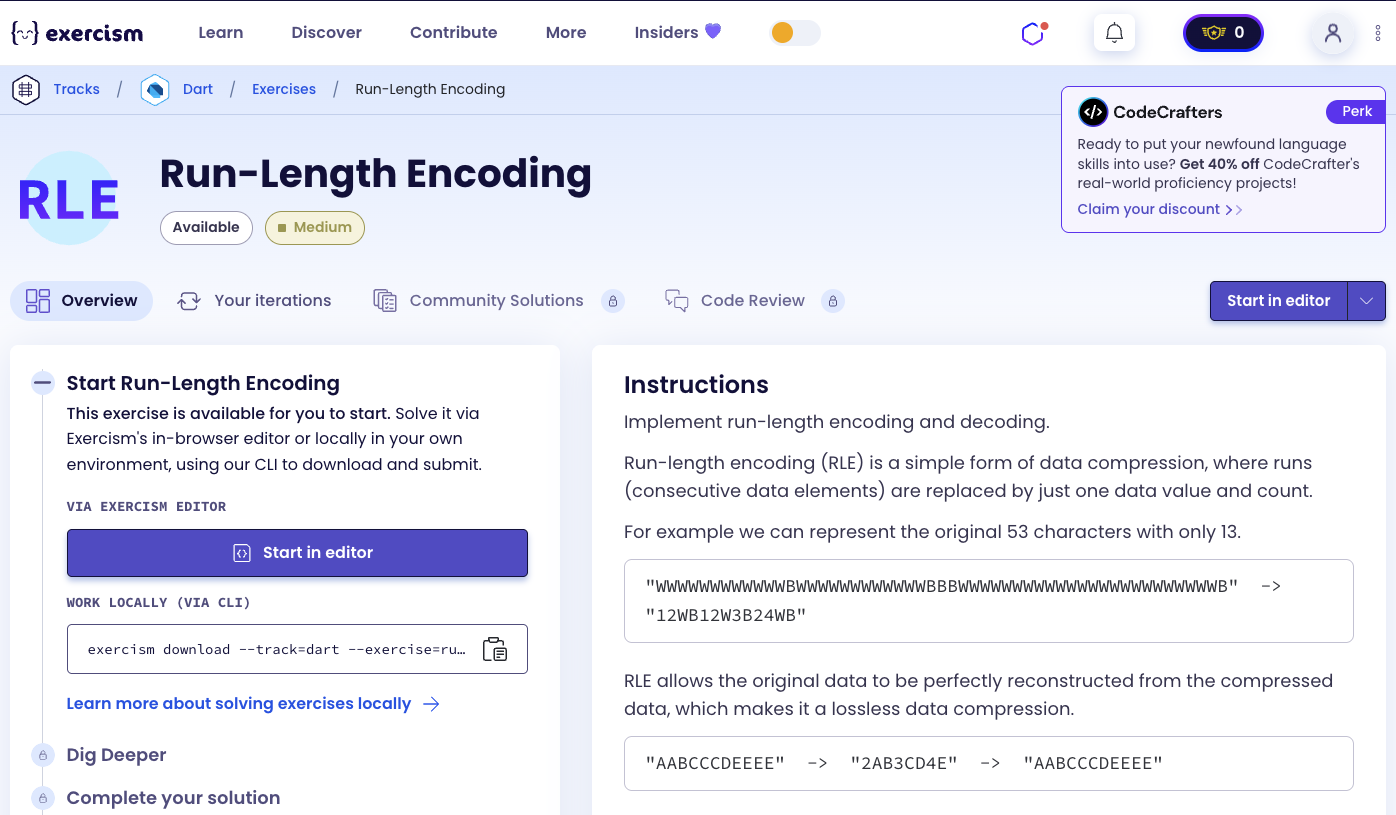
Implement run-length encoding and decoding.
Run-length encoding (RLE) is a simple form of data compression, where runs (consecutive data elements) are replaced by just one data value and count.
Example
For example we can represent the original 53 characters with only 13.
"WWWWWWWWWWWWBWWWWWWWWWWWWBBBWWWWWWWWWWWWWWWWWWWWWWWWB" -> "12WB12W3B24WB"RLE allows the original data to be perfectly reconstructed from the compressed data, which makes it a lossless data compression.
"AABCCCDEEEE" -> "2AB3CD4E" -> "AABCCCDEEEE"Instructions
For simplicity, you can assume that the unencoded string will only contain the letters A through Z (either lower or upper case) and whitespace. This way data to be encoded will never contain any numbers and numbers inside data to be decoded always represent the count for the following character.
How does run-length encoding work?
Encoding:
- Find runs of consecutive identical characters
- Replace each run with:
- Count (if > 1) followed by the character
- Just the character (if count = 1)
- Example: “AA” → “2A”, “B” → “B”, “CCC” → “3C”
Decoding:
- Find patterns of optional digits followed by a character
- Parse the count (default to 1 if no digits)
- Repeat the character that many times
- Example: “2A” → “AA”, “B” → “B”, “3C” → “CCC”
The key insight is using regular expressions with capture groups to identify runs (encoding) and count+character patterns (decoding), then using replaceAllMapped() to transform the string.
Solution
class RunLengthEncoder {
  String encode(String input) =>
      input.isEmpty
          ? ''
          : input.replaceAllMapped(
              RegExp(r'(.)\1*'),
              (m) => '${m[0]!.length > 1 ? m[0]!.length : ''}${m[1]}');

  String decode(String input) =>
      input.isEmpty
          ? ''
          : input.replaceAllMapped(
              RegExp(r'(\d*)([^\d])'),
              (m) => m[2]! * (m[1]!.isEmpty ? 1 : int.parse(m[1]!)));
}
Let’s break down the solution:
-
class RunLengthEncoder- Main class:- Encapsulates encoding and decoding logic
- Contains two methods:
encode()anddecode()
-
String encode(String input)- Encoding method:- Takes an unencoded string
- Returns run-length encoded string
- Expression-bodied method (uses
=>)
-
input.isEmpty ? '' : ...- Handle empty input:- Returns empty string if input is empty
- Ternary operator for concise conditional
- Prevents processing empty strings
-
input.replaceAllMapped(RegExp(r'(.)\1*'), ...)- Replace runs:- Uses
replaceAllMapped()to transform the string - Regular expression pattern:
(.)\1* - Matches each run of consecutive identical characters
- Uses
-
RegExp(r'(.)\1*')- Encoding pattern:(.)- Capture group 1: any single character\1*- Backreference: zero or more of the same character- Matches: “AA”, “B”, “CCC”, “DDDD”, etc.
- Example: “AAB” matches “AA” and “B” separately
-
(m) => '${...}${m[1]}'- Replacement function:- Takes Match object
m - Returns replacement string
- Uses string interpolation to build result
- Takes Match object
-
m[0]!.length > 1 ? m[0]!.length : ''- Count logic:m[0]!- Full match (the entire run, e.g., “AA”)m[0]!.length- Length of the run- If length > 1: include count in output
- If length = 1: no count (empty string)
- Example: “AA” (length 2) → “2”, “B” (length 1) → ""
-
m[1]- Capture group 1:- The character that was captured
- Example: for “AA”, m[1] = “A”
- Always included in output
-
'${count}${m[1]}'- Build encoded string:- Combines count (if any) and character
- Example: “AA” → “2A”, “B” → “B”
-
String decode(String input)- Decoding method:- Takes an encoded string
- Returns decoded (original) string
- Expression-bodied method
-
input.isEmpty ? '' : ...- Handle empty input:- Returns empty string if input is empty
- Same pattern as encode
-
input.replaceAllMapped(RegExp(r'(\d*)([^\d])'), ...)- Replace patterns:- Uses
replaceAllMapped()to transform encoded string - Regular expression pattern:
(\d*)([^\d]) - Matches each count+character pair
- Uses
-
RegExp(r'(\d*)([^\d])')- Decoding pattern:(\d*)- Capture group 1: zero or more digits (the count)([^\d])- Capture group 2: one non-digit character (the character)- Matches: “12W”, “B”, “3C”, etc.
- Example: “12WB” matches “12W” and “B” separately
-
(m) => m[2]! * ...- Replacement function:- Takes Match object
m - Returns repeated character
m[2]!- Capture group 2 (the character to repeat)
- Takes Match object
-
m[2]! * (m[1]!.isEmpty ? 1 : int.parse(m[1]!))- Repeat character:m[1]!- Capture group 1 (the count digits, may be empty)m[1]!.isEmpty ? 1 : int.parse(m[1]!)- Parse count or default to 1m[2]! * count- Repeat character count times- Example: “12W” → m[1]=“12”, m[2]=“W” → “W” * 12 = “WWWWWWWWWWWW”
- Example: “B” → m[1]="", m[2]=“B” → “B” * 1 = “B”
The solution elegantly uses regular expressions with capture groups and replaceAllMapped() to transform strings. The encoding pattern (.)\1* matches runs of identical characters, and the decoding pattern (\d*)([^\d]) matches count+character pairs. String multiplication is used to repeat characters during decoding.
A video tutorial for this exercise is coming soon! In the meantime, check out my YouTube channel for more Dart and Flutter tutorials. 😉
Visit My YouTube Channel