Exercism - Acronym
This post shows you how to get Acronym exercise of Exercism.
Preparation
Before we click on our next exercise, let’s see what concepts of DART we need to consider
So we need to use the following concepts.
String toUpperCase Method
The toUpperCase() method converts all characters in a string to uppercase. It’s essential for creating acronyms in uppercase.
void main() {
  String phrase = "Portable Network Graphics";

  // Convert to uppercase
  String upper = phrase.toUpperCase();
  print(upper); // "PORTABLE NETWORK GRAPHICS"

  // Use before processing
  String processed = phrase.toUpperCase().split(' ');
  print(processed); // [PORTABLE, NETWORK, GRAPHICS]
}
String Split with RegExp
The split() method can take a regular expression pattern to split on multiple delimiters. This is useful for splitting on spaces, hyphens, and other characters.
void main() {
  String phrase = "Liquid-crystal display";

  // Split on spaces
  List<String> words1 = phrase.split(' ');
  print(words1); // [Liquid-crystal, display]

  // Split on hyphens
  List<String> words2 = phrase.split('-');
  print(words2); // [Liquid, crystal display]

  // Split on multiple delimiters using RegExp
  RegExp pattern = RegExp(r'[ ,-]+');
  List<String> words3 = phrase.split(pattern);
  print(words3); // [Liquid, crystal, display]

  // Pattern breakdown:
  // [ ,-] - character class matching space or hyphen
  // + - one or more occurrences
}
Regular Expressions (RegExp)
Regular expressions allow you to match patterns in strings. Character classes [] match any character within the brackets, and + means one or more.
void main() {
  // Pattern: one or more of space, hyphen, or underscore
  RegExp pattern = RegExp(r'[_, ,-]+');

  // Test splitting
  String phrase1 = "As Soon As Possible";
  print(phrase1.split(pattern)); // [As, Soon, As, Possible]

  String phrase2 = "Liquid-crystal display";
  print(phrase2.split(pattern)); // [Liquid, crystal, display]

  String phrase3 = "Thank_George It's Friday!";
  print(phrase3.split(pattern)); // [Thank, George, It's, Friday!]

  // Pattern breakdown:
  // [_, ,-] - character class: underscore, space, or hyphen
  // + - one or more occurrences
  // This matches sequences of these separators
}
Map Method
The map() method transforms each element in a collection. It’s perfect for extracting the first character of each word.
void main() {
  List<String> words = ['Portable', 'Network', 'Graphics'];

  // Get first character of each word
  var firstChars = words.map((word) => word[0]);
  print(firstChars.toList()); // [P, N, G]

  // With uppercase
  List<String> upperWords = ['PORTABLE', 'NETWORK', 'GRAPHICS'];
  var acronym = upperWords.map((word) => word[0]);
  print(acronym.toList()); // [P, N, G]

  // Chain operations
  String phrase = "Portable Network Graphics";
  var result = phrase
      .toUpperCase()
      .split(' ')
      .map((word) => word[0]);
  print(result.toList()); // [P, N, G]
}
String Join Method
The join() method combines all elements of a list into a single string, with an optional separator between elements.
void main() {
  List<String> letters = ['P', 'N', 'G'];

  // Join without separator
  String acronym = letters.join();
  print(acronym); // "PNG"

  // Join with separator
  String withDash = letters.join('-');
  print(withDash); // "P-N-G"

  // Complete acronym generation
  List<String> words = ['Portable', 'Network', 'Graphics'];
  String result = words.map((w) => w[0]).join();
  print(result); // "PNG"
}
Method Chaining
Method chaining allows you to call multiple methods in sequence. Each method operates on the result of the previous one, creating a pipeline of transformations.
void main() {
  String phrase = "Portable Network Graphics";

  // Chain: uppercase → split → map → join
  String acronym = phrase
      .toUpperCase()                    // "PORTABLE NETWORK GRAPHICS"
      .split(' ')                       // [PORTABLE, NETWORK, GRAPHICS]
      .map((word) => word[0])           // [P, N, G]
      .join();                          // "PNG"

  print(acronym); // "PNG"

  // With RegExp split
  String phrase2 = "Liquid-crystal display";
  String acronym2 = phrase2
      .toUpperCase()
      .split(RegExp(r'[ ,-]+'))
      .map((word) => word[0])
      .join();
  print(acronym2); // "LCD"
}
String Indexing
You can access individual characters in a string using square brackets with an index. The first character is at index 0.
void main() {
  String word = "Portable";

  // Access first character
  String first = word[0];
  print(first); // 'P'

  // Get first character of each word
  List<String> words = ['Portable', 'Network', 'Graphics'];
  for (var word in words) {
    print(word[0]); // P, N, G
  }

  // Use in map
  var firstChars = words.map((word) => word[0]);
  print(firstChars.toList()); // [P, N, G]
}
Introduction
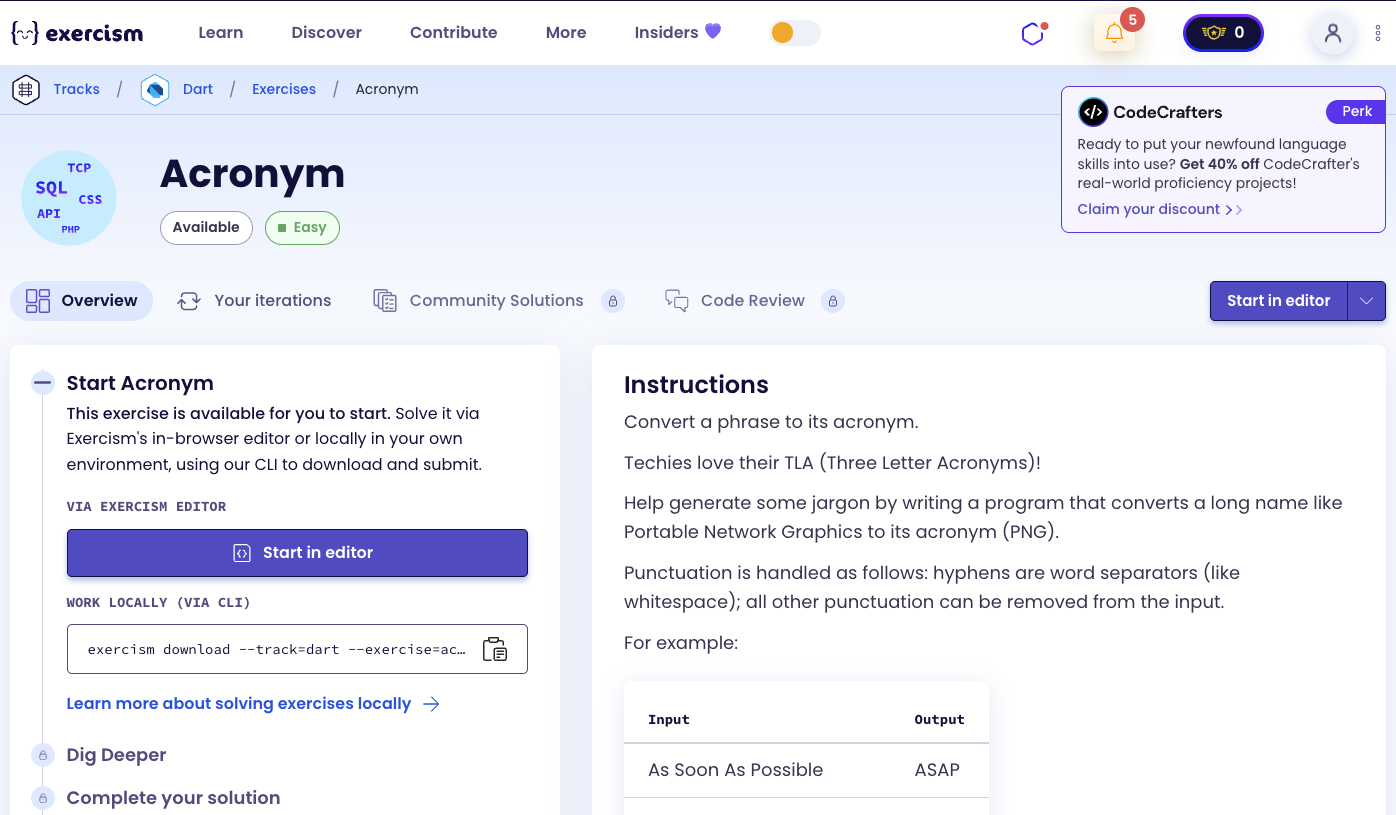
Convert a phrase to its acronym.
Techies love their TLA (Three Letter Acronyms)!
Help generate some jargon by writing a program that converts a long name like Portable Network Graphics to its acronym (PNG).
Instructions
Punctuation is handled as follows: hyphens are word separators (like whitespace); all other punctuation can be removed from the input.
Examples
| Input | Output |
|---|---|
| As Soon As Possible | ASAP |
| Liquid-crystal display | LCD |
| Thank George It’s Friday! | TGIF |
What is an acronym?
An acronym is a word formed from the initial letters of a phrase. For example, “PNG” stands for “Portable Network Graphics”, and “ASAP” stands for “As Soon As Possible”. Acronyms are commonly used in technical fields, business, and everyday communication to make long phrases more concise and memorable.
— Linguistics
How can we generate an acronym?
To generate an acronym:
- Convert to uppercase: Make all letters uppercase for consistency
- Split into words: Split on spaces, hyphens, and underscores (these are word separators)
- Extract first letters: Get the first character of each word
- Join together: Combine all first letters into a single string
The key insight is using a regular expression to split on multiple word separators (spaces, hyphens, underscores), then extracting the first character of each resulting word.
For example, with “Portable Network Graphics”:
- Uppercase: “PORTABLE NETWORK GRAPHICS”
- Split: [‘PORTABLE’, ‘NETWORK’, ‘GRAPHICS’]
- First letters: [‘P’, ‘N’, ‘G’]
- Join: “PNG”
With “Liquid-crystal display”:
- Uppercase: “LIQUID-CRYSTAL DISPLAY”
- Split on [ ,-]+: [‘LIQUID’, ‘CRYSTAL’, ‘DISPLAY’]
- First letters: [‘L’, ‘C’, ‘D’]
- Join: “LCD”
Solution
class Acronym {
  String abbreviate(String sentence) {
    return sentence
        .toUpperCase()
        .split(RegExp(r'[_, ,-]+'))
        .map((word) => word[0])
        .join();
  }
}
Let’s break down the solution:
-
String abbreviate(String sentence)- Main method that generates the acronym:- Takes a phrase as input
- Returns the acronym as a string
-
.toUpperCase()- Convert to uppercase:- Converts all characters to uppercase
- Ensures the acronym is in uppercase
- Example: “Portable Network Graphics” → “PORTABLE NETWORK GRAPHICS”
-
.split(RegExp(r'[_, ,-]+'))- Split on word separators:- Uses a regular expression pattern to split on multiple delimiters
- Pattern
r'[_, ,-]+':[_, ,-]- Character class matching underscore, space, or hyphen+- One or more occurrences (handles multiple consecutive separators)
- Splits the string into words, removing separators
- Example: “Liquid-crystal display” → [‘LIQUID’, ‘CRYSTAL’, ‘DISPLAY’]
- Example: “As Soon As Possible” → [‘AS’, ‘SOON’, ‘AS’, ‘POSSIBLE’]
-
.map((word) => word[0])- Extract first character:- Transforms each word to its first character
- Uses string indexing
word[0]to get the first character - Example: [‘PORTABLE’, ‘NETWORK’, ‘GRAPHICS’] → [‘P’, ‘N’, ‘G’]
-
.join()- Combine into acronym:- Joins all first letters together without any separator
- Example: [‘P’, ‘N’, ‘G’] → “PNG”
The solution efficiently generates acronyms by chaining string operations: uppercase → split → map → join. The regular expression pattern handles multiple word separators (spaces, hyphens, underscores) in a single split operation.
You can watch this tutorial on YouTube. So don’t forget to like and subscribe. 😉
Watch on YouTube